
CookBook - Recipe Manager
CookBook Co.Food & Drink
4.7310.00 Reviews
- Version
- 3.0.245
- Installs
- 100.00K
- Age Rating
- Everyone
Screenshots


Our Review of CookBook - Recipe Manager
 Analysis by Appyee
Have you ever found yourself lost in a sea of recipes, unsure of which one to try next? Enter CookBook - Recipe Manager, a delightful app designed to bring order and inspiration to your culinary adventures. As someone who loves cooking but often finds herself overwhelmed by the sheer number of options, this app has been a game-changer.
What the current version is built to do
CookBook is a food and drink app from CookBook Co. that brings recipe keeping, meal planning and shopping lists into one place. It is free to install, though in-app purchases range from $6.99 to $39.99 per item. Its average rating is 4.7 from around 1.9 thousand ratings, and it has over 100 thousand installs. It is rated for Everyone, which makes the intended audience broad, but the value still depends on whether you actually want a dedicated home for recipes rather than another way to browse them.
The version currently available is 3.0.245, and the app first appeared on May 20, 2021. That gives me a useful point of reference, but not a changelog: I would not treat a version number by itself as proof that a particular feature has recently changed. What I can judge is the present mix of tools and how they fit together. The central idea is practical: collect recipes, keep them findable, plan meals, and turn those plans into a list for the shop.
That combination makes most sense for someone whose cooking ideas are scattered between saved web pages, screenshots, handwritten notes and messages from family. Instead of trying to replace every food website or social feed, the app can serve as the place where a recipe ends up once you have decided you might cook it. I find that distinction important: it is less about endless discovery and more about making saved inspiration usable on a Tuesday evening.
Getting Started with CookBook
First things first, downloading CookBook - Recipe Manager is simple and straightforward. Available on both Android and iOS, the app greets you with a clean and intuitive interface. No unnecessary frills or confusing menus here, just a streamlined design that gets you excited to dive into cooking.
Organizing Your Recipes
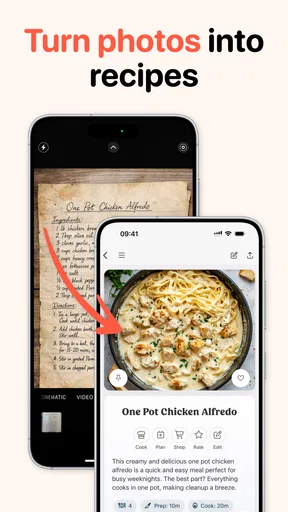
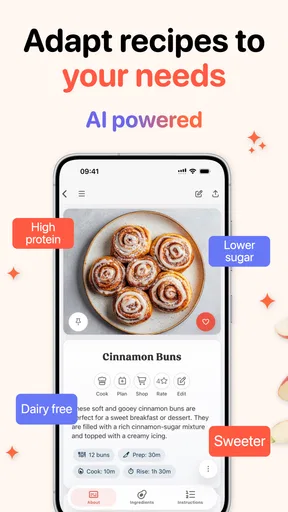
One of the standout features is the app's ability to organize your recipes effortlessly. You can import recipes from various sources with just a few taps. Have a beloved family recipe scribbled on a notecard? Snap a photo, and it’s digitally preserved within the app. It’s like having a personal assistant dedicated solely to your kitchen adventures.
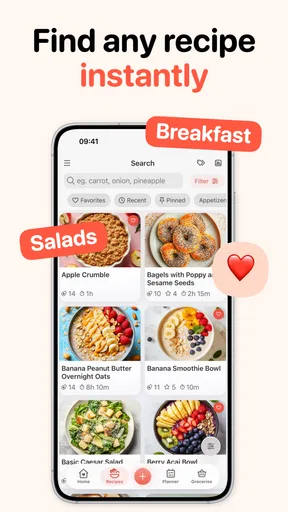
The categorization options are a lifesaver. Whether you’re vegan, gluten-free, or a meat-lover, you can neatly organize your recipes into categories that make sense for you. The search functionality is robust, allowing you to find exactly what you’re craving without scrolling endlessly.
Making recipe collection manageable
Importing is most helpful when I use it as a capture step, not as a promise that every recipe will be ready to cook immediately. When a recipe comes from a page or a photo, I would check its ingredients and method before relying on it at the stove. A quick edit at the point of saving can prevent a missing quantity or an unclear instruction from becoming a last-minute problem. That small bit of housekeeping is especially worthwhile for recipes I expect to make repeatedly.
There is also a useful trade-off between broad categories and precise labels. A few simple collections, such as weeknight meals, baking and family favourites, are easier to maintain than a long list of narrowly defined folders. I would reserve more specific labels for things I regularly search by, such as dietary needs or a main ingredient. That keeps the collection useful without turning recipe organization into another chore.
Cooking Made Easy
Once you’ve chosen a recipe, CookBook shines in its ability to guide you through the cooking process. Each recipe comes with clear, step-by-step instructions. What I love most is the interactive cooking mode. You can tick off each step as you go, keeping your process organized and stress-free.
CookBook - Recipe Manager also includes a handy voice command feature. Imagine having your hands covered in flour and needing to check what’s next. Just use a voice command, and voila, the app responds. It’s like having a sous-chef right in your kitchen!
A realistic weeknight routine
Here is where the combination of planning and cooking can earn its place. I might choose a recipe earlier in the week, add what I need to the shopping list, and then open the saved instructions when I get home. While cooking, ticking off steps gives me a simple way to keep track if I am also tending to a side dish or answering a question at the table. The benefit is not that dinner becomes effortless; it is that I spend less time hunting through browser tabs and trying to remember where I left off.
For a shared household, the same workflow can help with a practical handoff: the person shopping can use the list, while the person cooking can use the recipe collection. I would still review the list before leaving, because pantry staples and quantities are personal decisions that a generated list cannot make for me. This is a small but meaningful habit: treat the list as a draft to check, rather than assuming it knows what is already in the cupboard.
Grocery Shopping Simplified
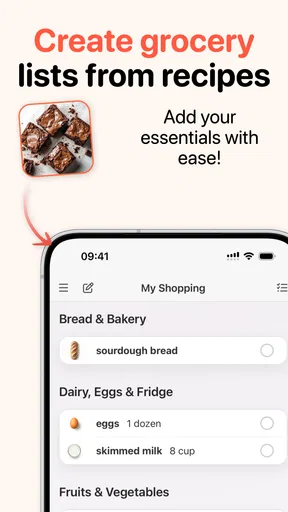
If you’re like me and often end up at the store without a list, CookBook’s shopping list feature will be your new best friend. You can generate a shopping list directly from your chosen recipes. The app allows you to tick off items as you go, ensuring you’ll never forget the all-important basil or garlic again.
It’s also worth mentioning the app’s ability to scale recipes. Whether you’re cooking for yourself or a party of ten, you can adjust the serving sizes, and the ingredient list updates automatically. This is particularly useful for those impromptu dinner parties.
Where planning helps, and where it needs your judgment
Scaling is handy when the number of diners changes, but I would not assume every ingredient behaves like a neat arithmetic problem. Seasoning, cooking time and the size of a pan may need personal judgment when a recipe is adjusted. I use the updated quantities as a starting point, then keep an eye on taste and texture as I cook. That is a better approach than blindly trusting any automatic conversion, especially when preparing a dish for guests.
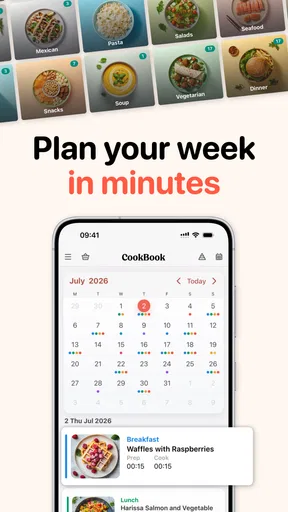
Meal planning is most useful when it reflects the week I actually have. I would choose a few recipes that share ingredients, then check the combined shopping list for overlap before shopping. That can reduce the chance of buying duplicate herbs or vegetables for separate meals. It also makes it easier to leave room for leftovers or an unplanned evening, rather than filling every day with a recipe and feeling behind when plans change.
Sharing and Community
Cooking is often a communal experience, and CookBook embraces this beautifully. You can share your favorite recipes with friends directly through the app. There’s also a vibrant community of users who share their culinary creations. It’s a fantastic way to discover new recipes and connect with fellow food enthusiasts.
The app also supports syncing across devices. You can start planning on your tablet and switch to your phone while shopping. Everything is connected, ensuring you have access to your recipes wherever you are.
How it compares with simpler alternatives
A notes app or a folder of bookmarks can be enough if you only save a handful of recipes and rarely revisit them. Those options are quick and familiar, but they do not naturally connect saved dishes to meal plans and shopping lists. CookBook is a better fit when the collection has grown large enough that finding, organizing and acting on a recipe are separate tasks you want to bring together.
On the other hand, someone who mainly wants a stream of new cooking videos or restaurant recommendations may be happier with a discovery-focused food app. CookBook’s strength is the personal collection and the path from saved recipe to planned meal; it is not a substitute for every kind of food content. I would also skip it if I prefer to cook entirely from memory or keep a paper notebook and have no trouble finding anything. An organizer is only useful if maintaining it saves more effort than it takes.
Who should use it, and what to keep in mind
I would recommend it most to home cooks who regularly save recipes from different places, plan meals ahead, or shop from several dishes at once. It can also suit a beginner who wants instructions and a repeatable place to keep successful meals. A family recipe collection is another sensible use: digitizing treasured notes makes them easier to search and share, though I would preserve the original cards if they have sentimental value.
There are limits to the convenience. Imported content may need a careful look, a generated shopping list still benefits from a pantry check, and scaled quantities do not replace cooking judgment. The app is free to start, but the in-app purchase range is worth considering if you are deciding how much of your routine to build around it. I would first see whether its core organization and planning approach suits the way I cook before paying for anything.
What I would watch as a regular user
For existing users, the practical question is whether the current version continues to make the everyday loop—save, find, plan, shop and cook—feel coherent. The release date and version identify the product’s present point in time, but they do not tell me what changed between releases, so I would judge future updates by their visible effect on that routine rather than by a larger version number alone. Clearer imports, dependable access across devices and less friction when turning a plan into a list would matter more to me than extra features that complicate the basics.
If you already have a large recipe library, I would try one ordinary week before moving everything over. Save a few recipes you genuinely expect to cook, make a short plan, and see whether the search and list fit naturally into your existing habits. That low-stakes test answers the real question better than a feature checklist: does this app reduce the small bits of kitchen admin that annoy you, or does it create another collection to maintain?
Final Thoughts
In a world where time is often limited, CookBook - Recipe Manager simplifies the cooking process while keeping it enjoyable and inspiring. From organizing and finding recipes to simplifying grocery shopping and cooking, this app is a must-have for anyone looking to enhance their culinary repertoire.
The blend of practical features and a user-friendly interface makes CookBook not just another app on your phone but a vital tool in your cooking journey. If you’re ready to take your kitchen adventures to the next level, give CookBook a try. Your future self, and taste buds, will thank you!
Verdict
Strengths of CookBook - Recipe Manager
- User-friendly interface for easy navigation.
- Extensive library of diverse recipes.
- Customizable meal planning features.
- Offline access to saved recipes.
- Ingredient search function is efficient.
Limitations of CookBook - Recipe Manager
- Limited free recipe access without subscription.
- Occasional syncing issues between devices.
- In-app ads can be intrusive.
- Some features require internet connection.
- No option for dark mode interface.
Other Releases by CookBook Co.
View All
foodbymaria Delicious Recipes
Food & Drink4.7
Similar Picks in This Category
View All
Rappi: Food Delivery, Grocery
Rappi, Inc - Delivery3.5

McDonald’s: Cupons e Delivery
Arcos Dorados4.3

Swiggy: Food Instamart Dineout
Swiggy4.7

Blinkit: Groceries & more
Blinkit4.8

foodpanda: food & groceries
Foodpanda GmbH a subsidiary of Delivery Hero SE4.0

Zomato: Food Delivery & Dining
Zomato4.7
Frequently Asked Questions
What features does CookBook - Recipe Manager offer?
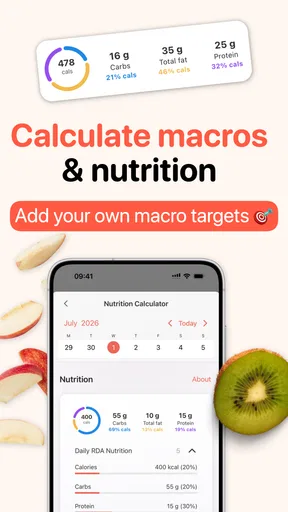
CookBook - Recipe Manager provides a comprehensive suite of features designed to enhance your cooking experience. It allows you to store and organize recipes, create shopping lists, and meal plans. You can also import recipes from websites, adjust serving sizes, and access your collection offline. The app supports multiple devices and syncs across platforms.
Is CookBook - Recipe Manager user-friendly for beginners?
Yes, CookBook - Recipe Manager is designed with an intuitive interface suitable for beginners. The app features easy navigation, clear instructions, and customizable categories that help newcomers efficiently manage their recipes. Additionally, video tutorials and customer support are available to assist new users in maximizing the app’s potential.
Does CookBook - Recipe Manager support dietary restrictions and preferences?
Absolutely, CookBook - Recipe Manager allows users to filter and tag recipes based on dietary needs and preferences, such as vegan, gluten-free, or keto. Users can easily search and organize recipes that meet specific nutritional requirements, making it convenient to maintain a tailored diet plan without hassle.
How secure is my data in CookBook - Recipe Manager?
CookBook - Recipe Manager prioritizes user data security by implementing robust encryption and secure cloud storage. The app ensures that your recipes and personal data are protected, with options for regular backups. Users can also set up multi-factor authentication for an added layer of security.
Is there a cost associated with using CookBook - Recipe Manager?
CookBook - Recipe Manager offers a free version with basic features, while the premium version includes advanced functionalities like unlimited recipe imports, additional storage, and ad-free browsing. Users can choose the plan that best suits their needs, with flexible subscription options available for a nominal fee.
